
HealthQura Clinical · For physicians
Clinical intelligence built around the doctor.
HealthQura helps physicians organise symptoms, review patient history, evaluate clinical possibilities, explore investigations and treatment options, check medication information, and document the consultation, while keeping the physician in control.
Physician in controlAI assists; you make every decision
Evidence and reasoningSuggestions show why, not just what
Built for Indian practiceIndian drug brands and Jan Aushadhi generics
Hosted in IndiaApplication servers in AWS Mumbai, every access logged
What HealthQura Clinical solves
Three decisions every consultation depends on
Getting the diagnosis right, choosing the right medicine, and knowing it worked. HealthQura brings the right information to you at each step. You make every decision.
1How can the diagnosis be more accurate?
See the whole picture before you decide
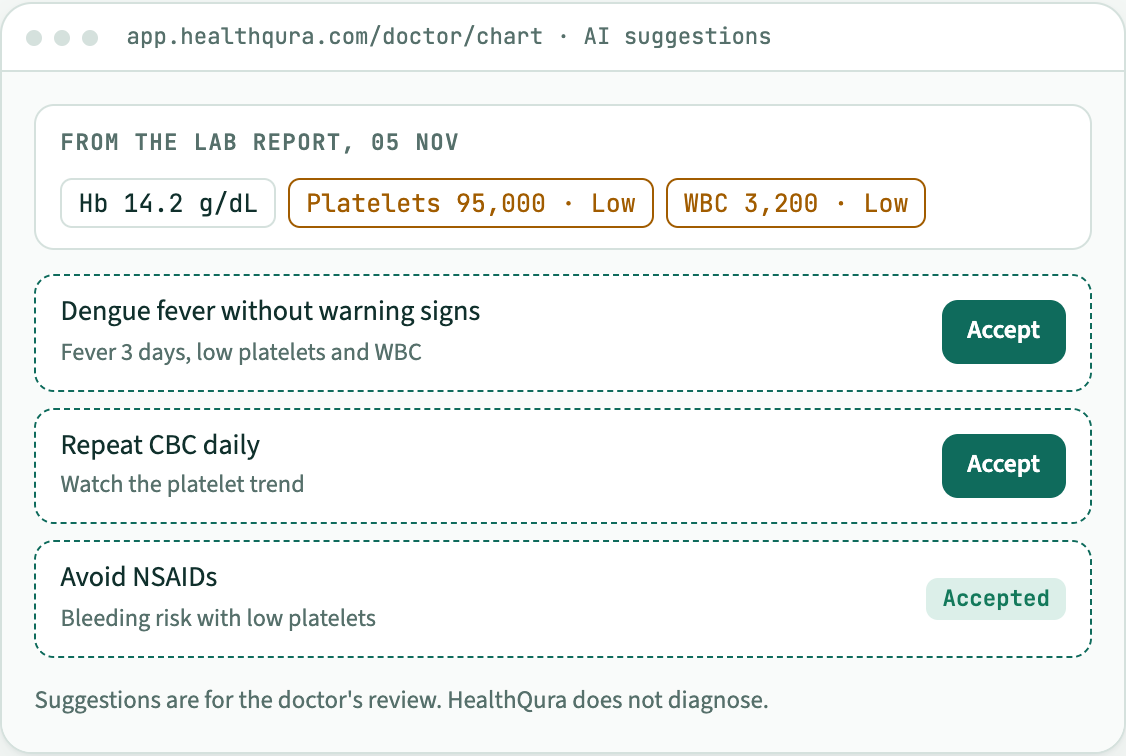
In a 50-patient OPD, a low platelet count in last week’s report or an allergy noted two visits ago is easy to miss. HealthQura reads the complaints, vitals, history and lab values together, and suggests a differential with the findings behind each one.
Differential considerations with the supporting findings shown
Lab report values brought into the chart, abnormal ones highlighted
Pregnancy, G6PD and kidney flags shape what it suggests
Nothing enters the record until you press Accept
2How do I select the right medication?
Every medicine checked before it reaches the patient
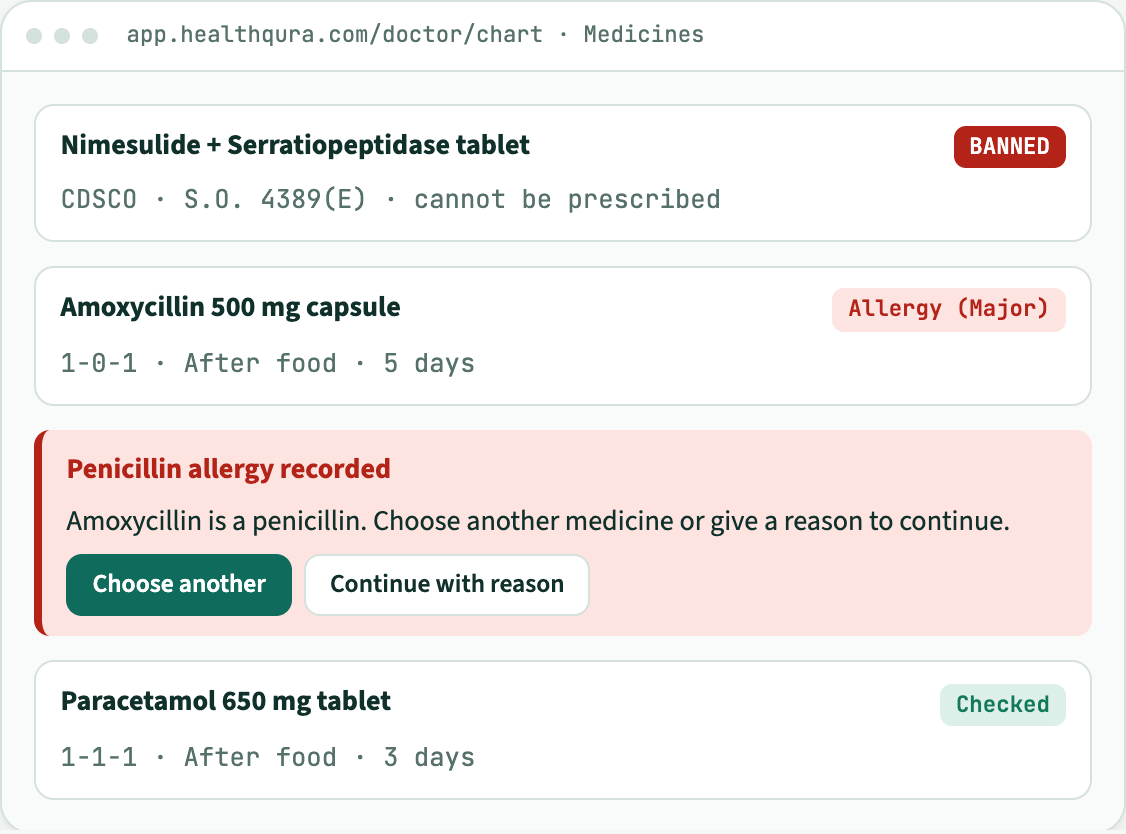
Search by the Indian brand you already use. HealthQura checks each medicine against CDSCO’s banned combination list, the patient’s allergies, their other medicines and, for children, their weight. If something is wrong, you choose another medicine or record why you are continuing.
Banned fixed-dose combinations flagged, with the gazette S.O. number
Allergy, interaction and contraindication checks
Brand ↔ molecule ↔ Jan Aushadhi generic
An override needs a reason, and it is kept in the record
3Did the medicine actually work?
Follow-ups that pick up where the last visit ended
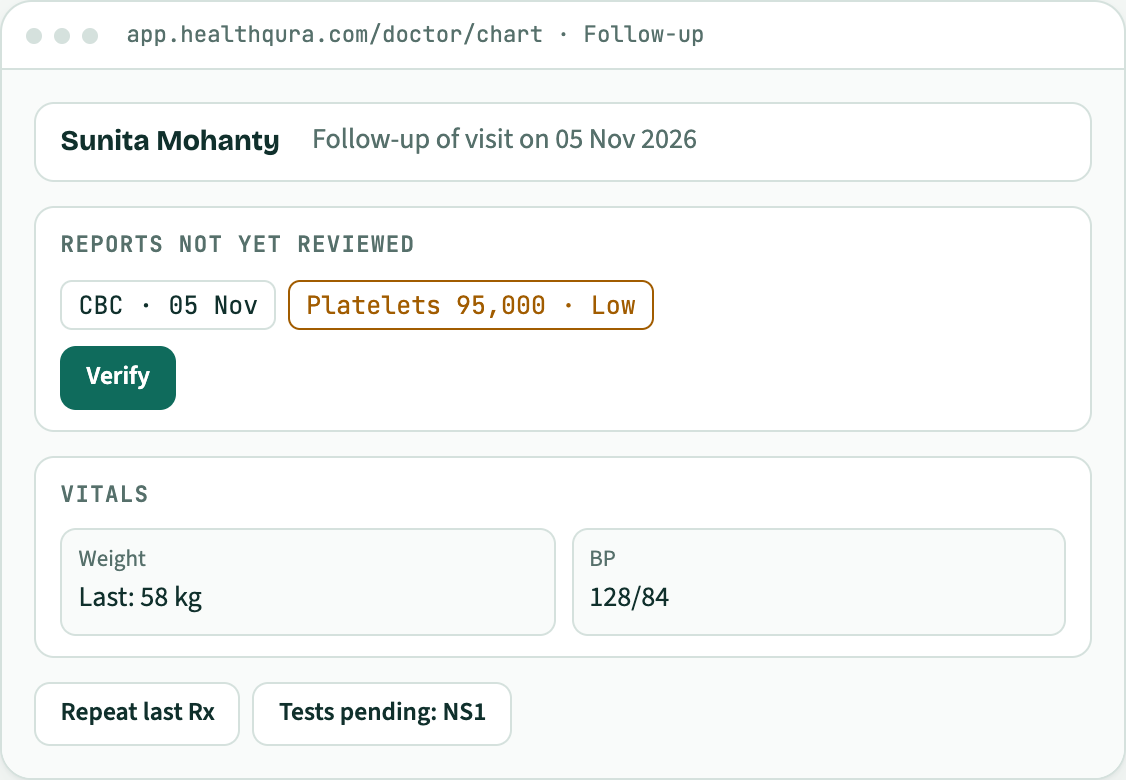
The prescription carries the follow-up date. When the patient comes back, the last visit’s medicines, vitals, pending tests and any new lab reports are already on the chart, so you can see at a glance whether the problem is resolving and decide to continue, change or stop the treatment.
Follow-up date and patient instructions on the print
Lab reports return to the chart through a QR code on the prescription
“Reports not yet reviewed”, last weight and pending tests waiting for you
Repeat the last prescription in one tap, with duplicates flagged
The consultation workflow
HealthQura assists at every stage. You make the final decision.
- PatientConsent and a single longitudinal record
- HistoryPast visits, medicines and allergies brought forward
- SymptomsTyped or consented voice, structured with vitals and reports
- Clinical reasoningA problem representation drafted for your review
- DifferentialConsiderations with supporting reasoning and evidence
- InvestigationRelevant tests suggested for consideration
- TreatmentOptions with references to explore
- PrescriptionInteraction, contraindication and dose references
- Follow-upA follow-up plan and patient instructions
What it does
The work around every consultation, handled
Open a patient encounter and HealthQura takes on the organising, checking and drafting, so your attention stays on the patient.
Capture the consultation
Typing or consented voice input in English.
Structure the record
History, symptoms, vitals and uploaded reports in one place.
Draft a problem representation
A concise clinical summary for you to review and edit.
Surface differential considerations
With the supporting reasoning and evidence behind each.
Suggest investigations
Relevant tests offered for your consideration.
Reference medicines
Drug, contraindication, interaction and dosage information.
Draft the prescription and note
Ready for physician approval, never sent without it.
Write patient instructions
In English, Odia or Hindi.
Plan the follow-up
An appropriate follow-up plan with reminders.
Keep longitudinal history
Every visit builds on the last.
HealthQura doesn’t replace the doctor.
It gives every doctor an intelligent clinical team beside them.
Question → Evidence → Decision. The questions are yours, the evidence is organised for you, and the decision always stays with you.
Voice input
Document the consultation as it happens
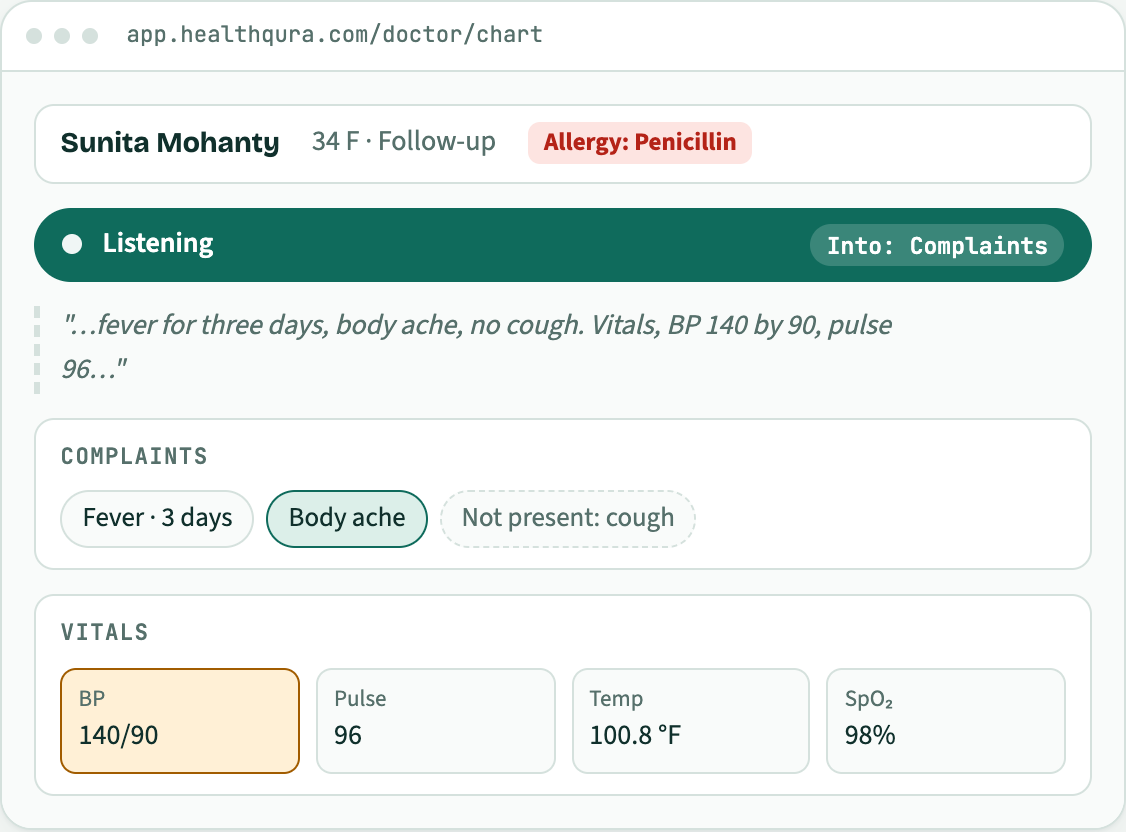
With the patient’s consent, dictate the history, examination and vitals in English instead of typing them. HealthQura places what you say into a structured clinical note for you to review and sign.
Voice input in English, available now
Works on an ordinary Android tablet, with an offline mode
Numbers such as BP and doses are shown for you to confirm
Odia and Odia–English dictation Coming soon
Safety & control
The AI assists. The physician decides.
HealthQura is a documentation and clinical reference tool for registered medical practitioners. It does not diagnose, treat or prescribe on its own.
Nothing is final until you accept it
Each AI suggestion waits for your approval. A draft can’t be printed or sent to the patient.
See where advice comes from
Suggestions show their sources so you can judge them quickly.
Switch AI off any time
Use HealthQura as a plain clinic and prescription system whenever you prefer.
Every access is recorded
An audit trail shows who opened or changed each patient record, and when.
For clinic owners
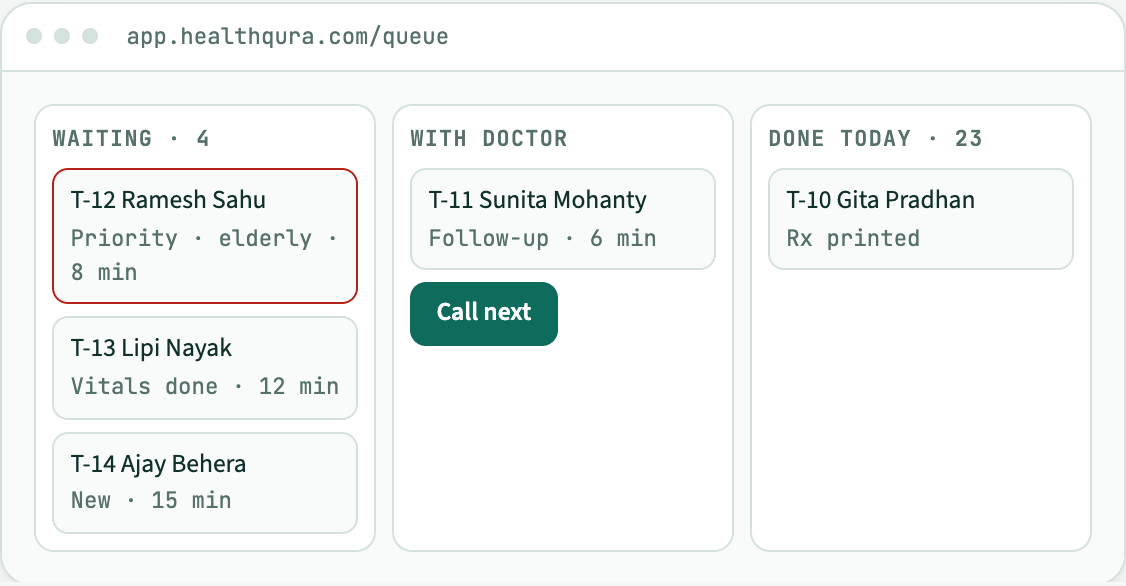
One queue for the front desk and the doctor
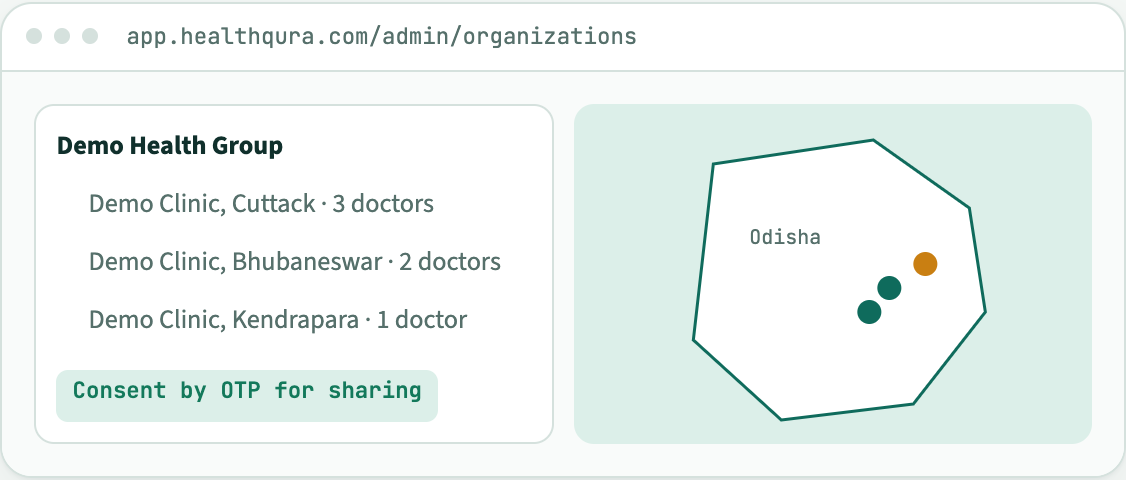
The front desk gives tokens and records vitals. The doctor presses Call next. Priority patients are marked and wait times are measured, across one clinic or many.
Who it’s for
Made for the way Indian OPDs actually run

General practitioners
50 patients a day, notes done by closing time
Dictate instead of typing, print clean prescriptions, and let follow-ups run on WhatsApp.
Specialists
Complex patients, many medicines
Interaction checks across long medication lists, structured follow-up and visit history at a glance.
Clinics & hospitals
Every doctor, one front desk
Appointments, queues, doctor calendars, patient records and reports for the whole clinic.
Founding Doctors
Free for Founding Doctors during the pilot
We are building HealthQura Clinical with a small group of physicians first. Join now and help shape it in your own OPD.
During the pilot
No charge
Use HealthQura Clinical in your practice at no cost while we build it with you. No card, no commitment.
At launch
A founding price, locked for three years
When paid plans begin, Founding Doctors get a special founding price that stays the same for three years.
From day one
Personal onboarding
We set it up with you, train your staff and give you a direct line to the product team.
Simple annual plans for individual doctors, clinics and hospitals will be announced at launch. Founding Doctors hear first. Running a hospital or clinic chain? Ask us about a pilot for your team.
Questions about the pilot? Email or WhatsApp our team:
Is your doctor using HealthQura?
See your prescriptions and appointments, answer follow-up messages on WhatsApp, and upload test reports with the QR code on your prescription.
Questions doctors ask
Frequently asked questions
Does HealthQura diagnose or treat patients?
No. HealthQura Clinical is a clinical documentation and reference tool for registered medical practitioners. It organises information, offers considerations with their reasoning and drafts notes; the physician reviews, edits and makes every decision.
Where is my patients’ data stored?
On HealthQura’s application servers in the AWS Mumbai region, with access logging for every record. See our Security page for how AI services are used.
Can I dictate in Odia?
Not yet. Voice input works in English today. Odia and Odia–English dictation is in development, and Founding Doctors will get it first. Whatever you dictate, you see the text before it is saved, and numbers like blood pressure and doses are shown for you to confirm.
What do I need to use it?
A phone, tablet or laptop with a recent browser and an internet connection. Basic voice dictation also works offline.
Can I stop using it?
Yes, at any time. There is no charge during the Founding Doctors pilot, and you can export your records whenever you like.
Founding Doctors programme
Help shape HealthQura Clinical in your own practice
We are opening HealthQura Clinical to a small group of physicians in Odisha first. Founding Doctors use it free during the pilot, get personal onboarding and a direct line to the product team, and a founding price locked for three years when paid plans launch.
Open to registered medical practitioners. We verify your registration number before onboarding.
Prefer to talk first? Reach the founding team directly: